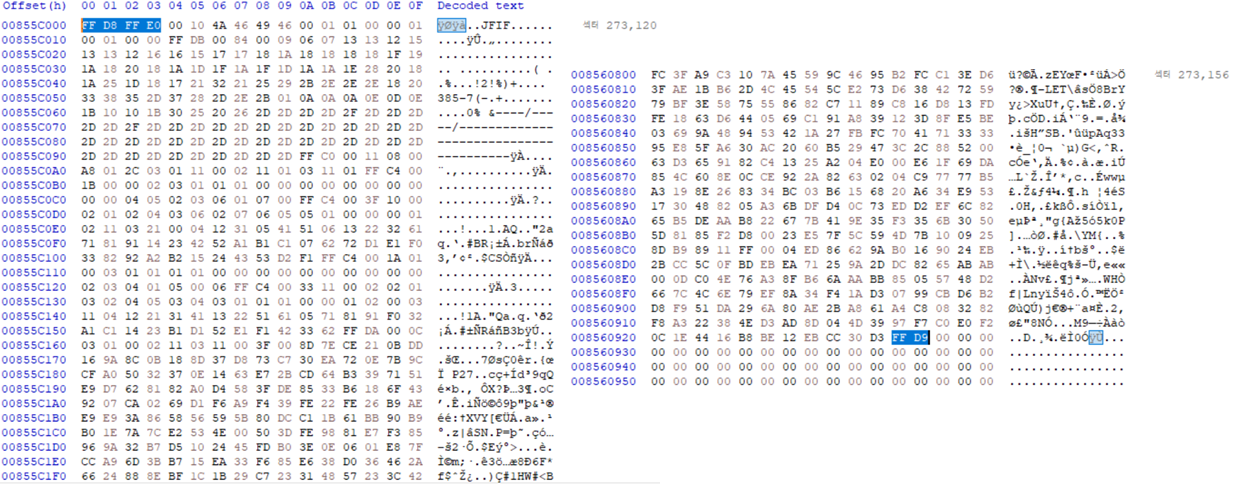
[Ext4 File System] 3. image 파일 분석 해보기 ( ext4_image1.001 )
cryptosecurity.tistory.com/15?category=841651
[ Ext4 File System ] 3. image 파일 분석 해보기 ( ext4_image1.001 )
ext4_image1.001 이미지를 HxD 프로그램으로 분석하고 파일을 추출해보자. 1. HxD 프로그램 열기 [도구] - [디스크 이미지 열기] - [ext4_image1.001 파일 선택] 디스크 이미지 열기를 하면 섹터 (512byte) 단위..
cryptosecurity.tistory.com
전에 ext4_image1.001, ext4_image2.001 이미지 파일을 분석해 보았다.
분석한 것을 토대로 파이썬으로 파싱해서 파일 목록 리스트 구해보자.
1. 모듈 설정
|
1
2
3
4
|
import binascii
import struct
sector = 512
|
cs |
binascii -> 바이너리와 ASCII 간의 변환 모듈
struct -> little endian 모듈
2. 이미지 파일 받아오기
|
1
2
|
image_name = input('Input the ext4 image name (ex. ext4_image1.txt) : ')
f = open(image_name, 'rb+')
|
cs |
3. little endian 함수
|
1
2
3
4
|
# little endian
def little4(hex4): return struct.unpack('<L', hex4)[0] # 4byte
def little2(hex2): return struct.unpack('<H', hex2)[0] # 2byte
def little1(hex1): return struct.unpack('<B', hex1)[0] # 1byte
|
cs |
little4() : 4byte Hex 값을 little endian해서 10진수로 변환하는 함수
little2() : 2byte Hex 값을 little endian해서 10진수로 변환하는 함수
little1() : 1byte Hex 값을 little endian해서 10진수로 변환하는 함수
4. MBR 함수
|
1
2
3
4
5
6
7
|
# MBR
def MBR():
f.seek(454)
LBA_str = f.read(4) # b'\x00\x08\x00\x00'
LBA = little4(LBA_str) # 2048
return LBA
|
MBR 영역에서 LBA 주소 구하는 함수
LBA = 오프셋 454부터 4byte 값을 little endian한 값
5. Super Block 함수
|
1
2
3
4
5
6
7
8
9
10
11
12
13
14
15
16
17
18
19
20
21
22
23
24
25
|
# Super Block
def Superblock(Superblock_addr):
f.seek(Superblock_addr * sector) # 2050 * 512
sb = f.read(sector)
# 4byte씩 나누기
sb_str = binascii.b2a_hex(sb).decode()
sb_list = [sb_str[i:i+8] for i in range(0, sector*2, 8)]
# log block size
log_block_hex = binascii.unhexlify(sb_list[7])
log_block = little4(log_block_hex)
if log_block == 0:
log_block_size = 1 # 1kb
elif log_block == 1:
log_block_size = 2 # 2kb
elif log_block == 2:
log_block_size = 4 # 4kb
# Inode_Per_Group
Inode_Per_Group_hex = binascii.unhexlify(sb_list[10])
Inode_Per_Group = little4(Inode_Per_Group_hex)
return log_block_size, Inode_Per_Group
|
cs |
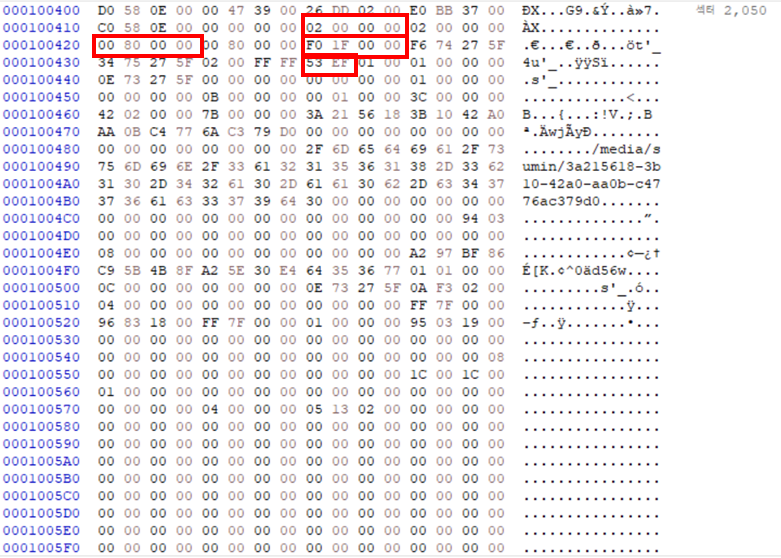
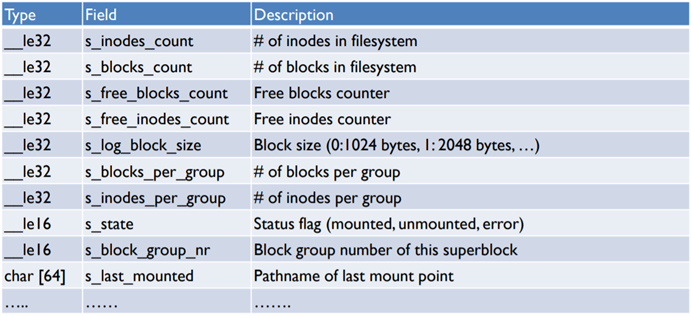
Super block 주소는 섹터단위이므로 Superblock_addr에 sector값을 곱해준다.
sb = 섹터 Super block 주소부터 512byte 값 저장
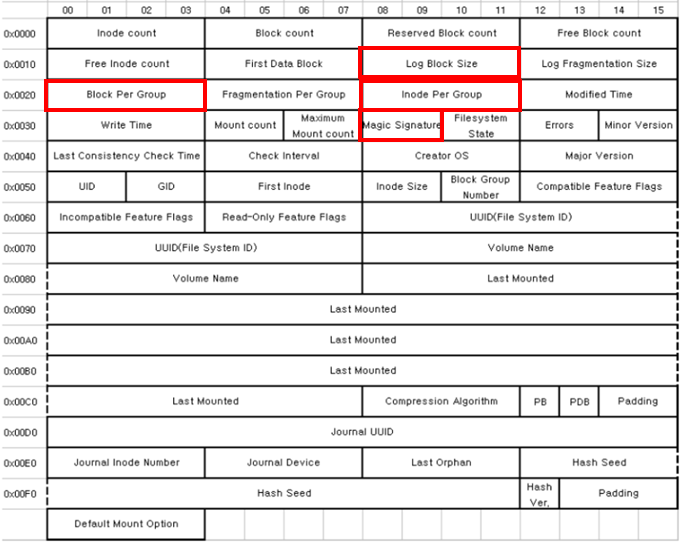
sb_list = 512byte를 4byte씩 나눠서 리스트에 저장
log_block = sb_list 중 7번째 값을 little endian한 값
log_block이 0이면 log_block_size는 1KB
log_block이 1이면 log_block_size는 2KB
log_block이 2이면 log_block_size는 4KB
Inode_Per_Group = sb_list 중 10번째 값을 little endian한 값
log_block_size와 Inode_Per_Group 값을 리턴하는 함수
|
1
2
|
log_block_size, Inode_Per_Group = Superblock(Superblock_addr )
GDT_addr = Superblock_addr - 2 + log_block_size * 2
|
cs |
GDT 주소는 Superblock 주소 - 2 + log_block_size x 2 이다.
GDT_addr = 2056
6. GDT (Group Descriptor Table) 함수
|
1
2
3
4
5
6
7
8
9
10
11
12
13
14
15
|
# Group Descriptor Table
def GDT(GDT_addr, bg_num):
bg_size = 32
f.seek(GDT_addr * sector + bg_size * bg_num)
GDT = f.read(bg_size)
GDT_str = binascii.b2a_hex(GDT).decode()
GDT_list = [GDT_str[i:i+8] for i in range(0, sector*2, 8)]
# Inode Table Address
Inode_Table_hex = binascii.unhexlify(GDT_list[2])
Inode_Table_dec = little4(Inode_Table_hex)
return Inode_Table_dec
|
cs |
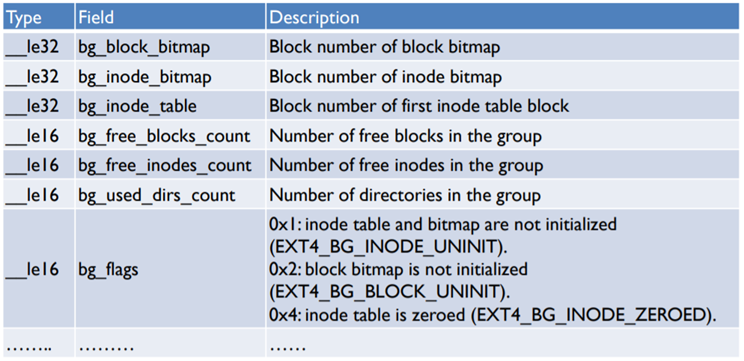
GDT 주소는 섹터단위이므로 GDT_addr에 sector값을 곱해준다.
GDT에는 Block Group 정보들이 32byte씩 여러개 저장되어 있다.
root_directory를 먼저 살펴봐야 하기에 이때는 Block Group 0번을 살펴봐야 한다. ( bg_num = 0 )
나중에 root_directory에 저장되어 있는 파일을 살펴 본 후 root_directory 안에 Directory 파일이 있을 경우에,
0이 아닌 bg_num 값을 받아오게 된다.
따라서 GDT_addr x sector 값에 bg_size x bg_num을 더해준다.
GDT = 섹터 GDT 주소 + (bg_size x bg_num)byte부터 32byte 값 저장
GDT_list = 32byte를 4byte씩 나눠서 리스트에 저장
Inode_Table_dec = GDT_list 중 2번째 값을 little endian한 값
|
1
2
|
Inode_Table_dec = GDT(GDT_addr, 0)
Inode_Table_addr = (Inode_Table_dec * log_block_size * 2) + LBA
|
cs |
root_directory를 살펴봐야 하기에 bg_num = 0을 넣는다.
Inode_Table 주소는 Inode_Table_dec x log_block_size x 2 + LBA 주소 이다.
7. Inode Table 함수
|
1
2
3
4
5
6
7
8
9
10
11
12
13
14
15
16
17
18
19
20
21
|
# Inode Table
def Inode_Table(Inode_Table_addr, Inode_num):
Inode_size = 256
f.seek(Inode_Table_addr * sector + Inode_size * (Inode_num - 1))
Inode = f.read(Inode_size)
Inode_str = binascii.b2a_hex(Inode).decode()
Inode_list = [Inode_str[i:i+8] for i in range(0, Inode_size*2, 8)]
# Directory Pointer
DP_list = Inode_list[10:22]
for a in reversed(DP_list):
if a != '00000000':
DP = a
break
DP_hex = binascii.unhexlify(DP)
DP_dec = little4(DP_hex)
return DP_dec
|
cs |
Inode Table 주소는 섹터단위이므로 Inode_Table_addr에 sector값을 곱해준다.
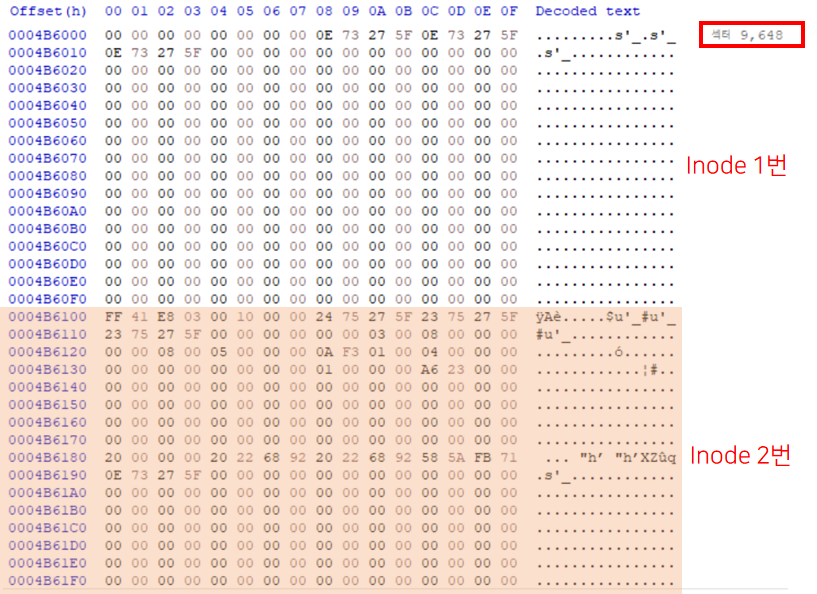
Inode Table에는 Inode 들이 여러개 저장되어 있다.그 중에 우리는 Root Directory 정보가 저장되어 있는 Inode 2번을 살펴볼 것이기에 Inode_num = 2 이다.따라서 Inode_Table_addr x sector 값에 Inode_size x (Inode_num - 1)을 더해준다.
Inode = (섹터 Inode Table 주소+ 256byte)부터 256byte 값 저장
Inode_list = 256byte를 4byte씩 나눠서 리스트에 저장
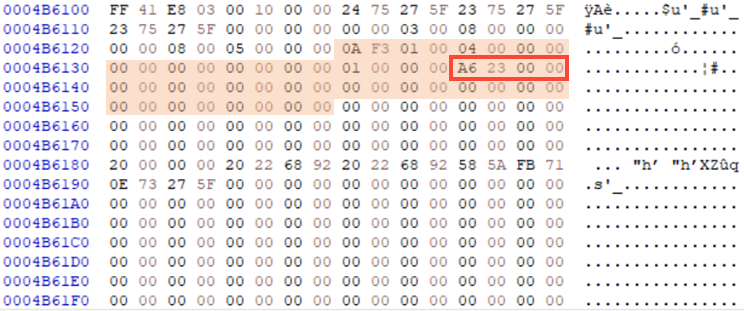
Directory Poiner는 Inode_list 중 10번부터 22번째 값 중 0이 아닌 제일 마지막 값이다.
DP_dec = DP_hex 값을 little endian한 값
|
1
2
|
DP_dec = Inode_Table(Inode_Table_addr, 2) # root directory
DP_addr = (DP_dec * log_block_size * 2) + LBA
|
cs |
Directory Pointer 주소는 DP x log_block_size x 2 + LBA 주소 이다.
8. Directory Entry 함수
|
1
2
3
4
5
6
7
8
9
10
11
12
13
14
15
16
17
18
19
20
21
22
23
24
25
26
27
28
29
30
31
32
33
34
35
36
37
38
39
40
41
42
43
44
45
46
47
48
49
50
51
52
53
|
# Directory Entry
def Directory_Entry(DP_addr):
DE_size = 256
f.seek(DP_addr * sector)
DE = f.read(DE_size)
# 1byte씩 나누기
DE_str = binascii.b2a_hex(DE).decode()
DE_list = [DE_str[i:i+2] for i in range(0, DE_size*2, 2)]
File_name, Dir_name, Block_Group_num = [], [], []
i = 24
while(i < DE_size):
# Inode_num
I_num_hex = binascii.unhexlify(DE_list[i] + DE_list[i+1] + DE_list[i+2] + DE_list[i+3])
Inode_num = little4(I_num_hex)
# record length
r_len_hex = binascii.unhexlify(DE_list[i+4] + DE_list[i+5])
record_len = little2(r_len_hex)
# file name length
n_len_hex = binascii.unhexlify(DE_list[i+6])
name_len = little1(n_len_hex)
# file type
FT_hex = binascii.unhexlify(DE_list[i+7])
FT_dec = little1(FT_hex)
if FT_dec == 0:
file_type = 'unknown'
elif FT_dec == 1:
file_type = 'Regular'
elif FT_dec == 2:
file_type = 'Directory'
# file name
name = []
for k in range(8, 8 + name_len):
name.append(DE_list[i+k])
name_hex = binascii.unhexlify(''.join(name))
name = name_hex.decode()
File_name.append(name)
if file_type == 'Directory' and name != 'lost+found':
Dir_name.append(name_hex.decode())
Block_Group_num.append(int((Inode_num-1)/Inode_Per_Group))
i += record_len
return File_name, Dir_name, Block_Group_num
|
cs |
Directory Entry 주소는 섹터단위이므로 DE_addr에 sector값을 곱해준다.
DE = 섹터 75056 부터 256byte 값 저장
DE_list = 256byte를 1byte씩 나눠서 리스트에 저장
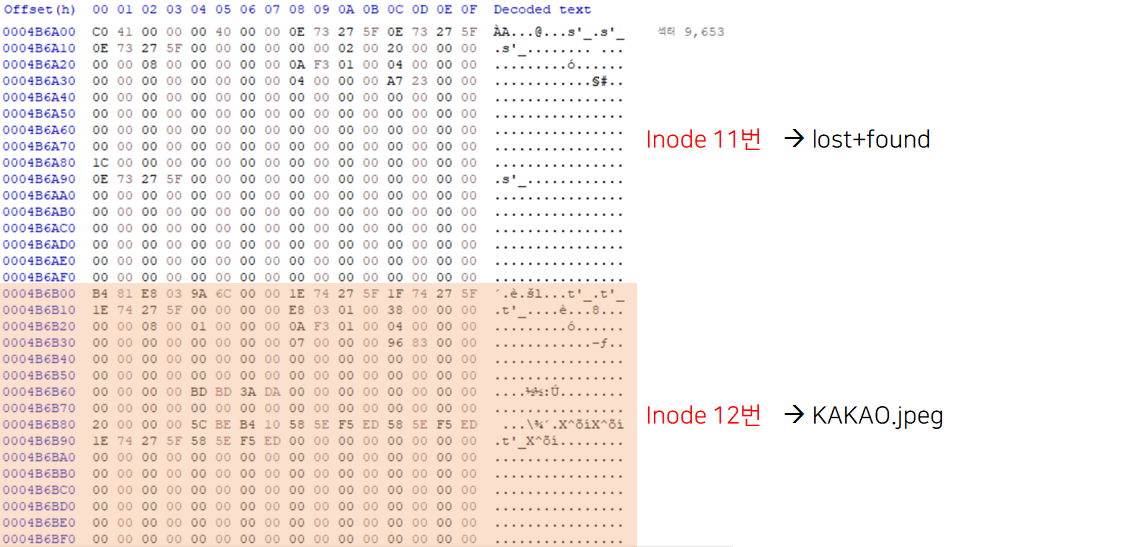
하나의 레코드 당
Inode num은 4byte
record length는 2byte
file name length는 1byte
file type은 1byte
file name은 file name length byte
로 구성되어 있다.
i = 24
Inode_num은 DE_list에 i번째 부터 4byte 값을 little endian한 값
record_len은 DE_list에 i+4번째 부터 2byte 값을 little endian한 값
name_len은 DE_list에 i+6번째 부터 1byte 값을 little endian한 값
FT_dec은 DE_list에 i+7번째 부터 1byte 값을 little endian한 값
name은 DE_list에 i+8번째 부터 file name length byte 값을 little endian한 값
i에 record length 값을 더하고 다시 반복
File_name에 name을 리스트로 저장
만약에 'lost+found' 제외하고 file_type이 Directory라면
Folder_name에 그때의 name을 리스트로 저장
Block_Group_num에 그때의 ( ( inode_num - 1 ) / Inode_Per_Group ) 값을 리스트 저장
File_name, Folder_name, Block_Group_num 반환
|
1
2
3
4
|
File_name, Dir_name, Block_Group_num = [], [], []
File_name, Dir_name, Block_Group_num = Directory_Entry(DP_addr)
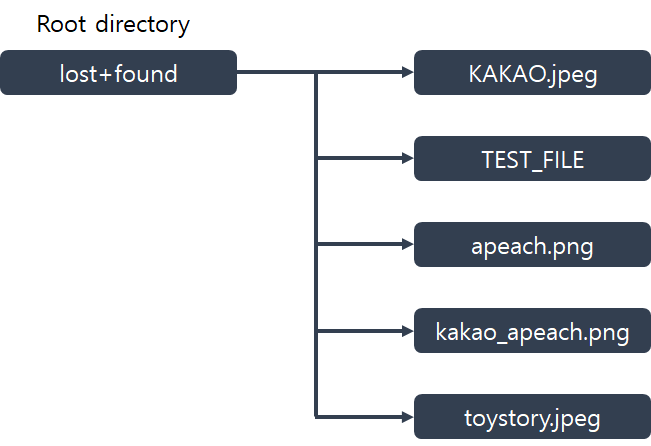
print('root -->', File_name)
|
cs |
root Directory에 들어있는 File_name을 출력한다.
|
1
2
3
4
5
6
7
8
9
10
11
12
13
14
15
16
|
while(len(Dir_name) != 0):
i=0
for bg_num in Block_Group_num:
f_Inode_Table_dec = GDT(GDT_addr, bg_num)
f_Inode_Table_addr = (f_Inode_Table_dec * log_block_size * 2) + LBA
f_DP_dec = Inode_Table(f_Inode_Table_addr, 1)
f_DP_addr = (f_DP_dec * log_block_size * 2) + LBA
f_File_name, f_Dir_name, f_Block_Group_num = [], [], []
f_File_name, f_Dir_name, f_Block_Group_num = Directory_Entry(f_DP_addr)
print(Dir_name[i], '-->', f_File_name)
i+=1
Block_Group_num, Dir_name= f_Block_Group_num, f_Dir_name
|
cs |
Dir_name 길이가 0이 아닐 때
Block_Group_num 값 하나하나를 bg_num으로 놓는다.
GDT(), Inode_Table(), Directory_Entry() 함수를 다시 통과해서 Directory안에 들어있는 Regular 파일을 구한다.
Dir_name 파일에 들어있는 f_File_name을 출력한다.
Directory 파일이 없을 때 까지 반복한다.
== 실행결과 ==
- ext4_image1.txt 이미지 실행 결과

- ext4_image2.txt 이미지 실행결과

'Digital Forensic > File System' 카테고리의 다른 글
| [ Ext4 File System ] 3. image 파일 분석 해보기 ( ext4_image1.001 ) (0) | 2020.10.03 |
|---|---|
| [ Ext4 File System ] 2. Ext4 파일시스템이란? (0) | 2020.09.09 |
| [ File System ] 1. 파일 시스템이란? (0) | 2020.09.09 |